Friday, May 13, 2016

What is a nonce? (15/250-2016)

In cryptography, a nonce is an arbitrary number that may only be used once.
It is often a random or pseudo-random number issued in an authentication protocol to ensure that old communications cannot be reused in replay attacks.

May include 
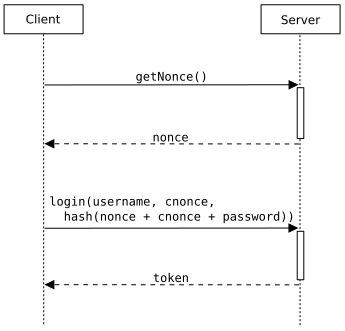
  • timestamp (requires clock synchronization between organizations)


Reference:
https://en.wikipedia.org/wiki/Cryptographic_nonce

Wednesday, May 11, 2016

Troubleshooting - com.ctc.wstx.exc.WstxIOException: Invalid UTF-8 start byte 0x8b (at char #2, byte #-1) (14/250-2016)


Error:
org.apache.cxf.workqueue.AutomaticWorkQueueImpl$AWQThreadFactory$1.run(AutomaticWorkQueueImpl.java:353)[118:org.apache.cxf.cxf-core:3.0.4.redhat-620133]
 at java.lang.Thread.run(Thread.java:745)[:1.7.0_79]
Caused by: com.ctc.wstx.exc.WstxIOException: Invalid UTF-8 start byte 0x8b (at char #2, byte #-1)
 at com.ctc.wstx.stax.WstxInputFactory.doCreateSR(WstxInputFactory.java:550)[112:woodstox-core-asl:4.4.1]

Scenario:

SOAPUI --> ESB --> Backend Service Provider
ESB invokes the backend Service Provider, but fails when the service provider sends a response back to ESB.

Caused By:

By default SOAP UI is set to "Accept compressed responses from host". Since client mentions that it can accept GZIP format of the response, the service provider sends the response in a GZIP format.


Analysis:

SOAPUI mentions that it can accept compressed response message, but ESB is not able to handle the GZIP format of the response from the backend service provider.

Resolution:
In ESB, in the producer cxf endpoint (which goes out to the backend service), we have to mention in the InInterceptor to unzip the response from the Backend Service Provider.


Troubleshooting - javax.net.ssl.SSLHandshakeException: sun.security.validator.ValidatorException: PKIX path building failed: sun.security.provider.certpath.SunCertPathBuilderException: unable to find valid certification path to requested target (13/250-2016)

Exception
javax.net.ssl.SSLHandshakeException: sun.security.validator.ValidatorException: PKIX path building failed: sun.security.provider.certpath.SunCertPathBuilderException: unable to find valid certification path to requested target

Scenario:
This exception occurs when trying to invoke a webservice with a privateKey (JKS file).

Cause:
The provider of the service expects the JKS file to also contain the public certificate

Resolution:

1. Download the public certificate from the webservice endpoint.
    a. open the endpoint in browser
    b. click on "view site information"
    c. click on details --> view certificate --> Certificate - details --> copy to file --> Export fileformat base64.

2. User the keytool to import the public certificate into the jks file (the private certificate)

keytool -import -alias symantec -keystore symantec_vip.jks -trustcacerts -file D:\installs\JFuse6.2_Dev\jboss-fuse-6.2.0.redhat-133\etc\vip_cert.cer

3. Resume testing.

Tuesday, May 10, 2016

Troubleshooting Bundle not Starting- (12/250-2016)


1. Feature or Bundle not installed 
JBossFuse:karaf@root> osgi:install MyBundleURL
JBossFuse:karaf@root> dev:dynamic-import <<bundle_id>>
JBossFuse:karaf@root> osgi:resolve <<bundle_id>>
JBossFuse:karaf@root> packages:imports <<bundle_id>>

2. Import-Package header is incomplete

Import package can be verified by using below commands on JBoss Fuse.
>>imports <bundle-id>
>>headers <bundle-id>


References:
https://access.redhat.com/documentation/en-US/Red_Hat_JBoss_Fuse/6.0/html/Deploying_into_the_Container/files/ch12s04.html

Wednesday, February 24, 2016

Connecting Canon MX490 to Google Cloud Printer

Connect the printer to the Google Cloud Print web service
  • Click the setup button
  • Select webservice setup
  • Connection setup
  • Google Cloud Print
  • Register for Google Cloud Print
  • A paper will be printed with a url (goo.gl/printer/......)
  • goto your browser - type in the url - this will register the printer to the google user

Share the Printer
  • https://www.google.com/cloudprint?user=0#printers
  • select the desired printer
  • add the desired user to the list of users who can use the printer

Monday, February 22, 2016

Apache Camle & Dozer - Java Bean to Bean mapper using Dozer. (11/250-2016)

Using dozer for Java Bean to Bean mapping in Apache Camel - makes life extremely simple to recursively copy data from one object to another.
The below steps will help to quickly add a dozer mapping file in OSGI Blueprint xml
  • In the blueprint.xml add the bean definitions below
    Note - the name of the camel context should be same as the argument index="0"

<bean id="dozerConverterLoader"
  class="org.apache.camel.converter.dozer.DozerTypeConverterLoader">
  <argument index="0" ref="abcdCamelContext" />
  <argument index="1" ref="abcMapper" />
</bean>
<bean id="abcMapper" class="org.apache.camel.converter.dozer.DozerBeanMapperConfiguration" />


  • Inside the route include the sample code to invoke the dozer mapping file.
  • Also mention the expected source object / destination object

<camelContext id="abcdCamelContext" xmlns="http://camel.apache.org/schema/blueprint">
  <route>
    <from uri="direct:test" />
    .....
<to uri="dozer:submitRequest?mappingFile=mapping/abcd.xml&amp;sourceModel=com.abcd.SourceReq&amp;targetModel=com.abcd.DestReq" />
    .....
  </route>
</camelContext>


  • Mapping file - location - under src/main/resources

<mappings xmlns="http://dozer.sourceforge.net" xmlns:xsi="http://www.w3.org/2001/XMLSchema-instance"
  xsi:schemaLocation="http://dozer.sourceforge.net  http://dozer.sourceforge.net/schema/beanmapping.xsd">
  
  <mapping wildcard="false">
    <class-a>com.abcd.SourceReq</class-a>
    <class-b>com.abcd.DestReq</class-b>
    
    <field>
      <a>caseNumberSrc</a>
      <b>caseNumberDest</b>
    </field>
  </mapping>
</mappings>


  • Sample Source Object - SourceReq

public class SourceReq {
 
 String caseNumberSrc;
 
 public String getCaseNumberSrc() {
  return caseNumberSrc;
 }
 public void setCaseNumberSrc(String caseNumberSrc) {
  this.caseNumberSrc = caseNumberSrc;
 }

}


  • Sample Destination Object - DestReq

public class DestReq {

 String caseNumberDest;

 public String getCaseNumberDest() {
  return caseNumberDest;
 }

 public void setCaseNumberDest(String caseNumberDest) {
  this.caseNumberDest = caseNumberDest;
 }
}


Saturday, February 13, 2016

Apache Camel - Synchronicity & Threading (9/250-2016)

A service can be called synchronously as well as asynchronously. 
After the service is invoked - the consumer can use multiple / single thread to complete the operation.

The factors which affect the threading model 

  • Component - which starts the process - whether it is fire and forget or request/reply messaging style
  • EIP - some support parallel processing (concurrency)
  • Configured Synchronicity - some components can be configure to be sync/async
  • Transactions - if a route is transacted -- the transactional context is limited to run within one thread only.
  • MEP (Message Exchange Pattern) - information in the exchange telling InOnly / OutOnly / InOut
Different scenarios discussed in the book - 
  • Async caller - Camel uses only one thread 
    • template.sendBody = InOnly Msg
    • caller sending InOnly Msg
    • single thread - pros
      • simple
      • support transaction propagation
    • cons
      • consumer threads can be overloaded by number of incoming messages
  • Sync Called - Camel uses multi thread
    • template.requestBody = InOutBody
  • Async caller - Camel uses only one thread
  • Sync caller - Camel uses multi thread

References: 

Apache Camel - How to use concurrency with WIPs? (8/250-2016)

Parallel Processing - 
EIPs in Camel that support concurrency - you can turn on parallel processing to use thread pool profiles to apply a matching thread pool (see pg 330 of Camel in Action)
  • Aggregate
  • Multicast -   (see pg 327 of   Camel in Action)
    • parallel processing of multiple routes - best used when multiple routes interacts with multiple systems
    • send copies of the msg to multiple routes
    • aggregate data after all execution complets
  • RecipientList
  • Splitter
  • Threads
  • WireTap
Custom Thread Pool - (see pg 320 of Camel in Action)

  • create thread pools using java.util.concurrent.Executors 
  • ExecutorService threadpool = Executors.newCachedThreadPool
    • the thread pool will grow and shrink - no upper bound - very aggressive
  • ExecutorService threadpool = Executors.newFixedThreadPool(20)


Staged Event Driven Architecture (SEDA) -  (see pg 322 of Camel in Action)

  •  breaks down complex application into statges using internal queues - to handover messages between routes.
  • eg:
from("file:\\...").to("seda:test")...from("seda:test?concurrentConsumers=20")

  • 20  

Thursday, February 11, 2016

Concurrency / Java Thread Pools and Apache Camel - (7/250-2016)


Concurrency - is multitasking.
Camel leverages concurrency features from Java - Thread Pools
  • Applications are generally bound by IO or CPU - Integration applications are generally bound by IO. Use concurrency only if applications are bound by IO
  • The example below shows the usage of concurrency in Camel - default pool size is 10.
  • The example can be changed with Custom Thread pools - and providing the number of threads in the pool.
Example:
<split streaming="true" parallelProcessing="true">
    <tokenize token="\n"/>
   <bean beanType="xxx.XyzService" method="testMeth"/>
</split>

  • There are situations where some applications (external systems) dont allow concurrency / allow till only a certain number of concurrent messages - check SLA first.
Thread Pools
  • java.util.concurrent package has the concurrency API - Java 1.5 onward.
  • Clients for this api are both Camel End users and Camel as well.
  • class ThreadPoolExecutor implements ExecutorService - provides thread pool with the options.
    • corePoolSize
    • maximumPoolSize
    • keepAliveTime
    • unit
    • rejected
    • workQueue
    • threadFactory
  • Managing Thread Pools
    • Shutdown
    • Management
    • Unique Thread names
    • Activity Logging
  • Ensure to Use human understandable thread names
Camel & Thread pools

  • Thread pools are not used directly but via configurations of thread pool profiles.
  • one default profiles and multiple custom profiles
    • poolSize
    • maxPoolSize
    • keepAliveTime
    • maxQueueSize
    • rejectedPolicy - Abot, CallerRuns, DiscardOldest, Discard
      • CallerRuns - will use the caller thread to execute the task
Example Default Thread Pool Profile:-
<camelContext .... >
    <threadPoolProfile id="testdefaultProfile" defaultProfile="true" maxPoolSize="50"/>
</camelContext>

Example Configuring the Custom Thread Pool Profile:-
  • Created using the ThreadPoolProfileSupport class -  "xyzPool" - this name will be referred later. (see pg 327 of   Camel in Action )
  • Set maxPoolSize to - say 100
  • register the ThreadPoolProfile to the context
  • all other options will be inherited from the default profile
  • in the camel route refer to the threadPool using the name "xyzPool"
    • .split(...).streaming().executorServiceRef("xyzPool").bean(...)
  • in spirng
    • <camelContext ....> 
      • <threadPoolProfile id="xyzPool" maxPoolSize="100"/>
    • </camelContext>


Custom Thread Pool

  • Java DSL - using ThreadPoolBuilder  (see pg 328 of   Camel in Action )
  • Spring - using <threadPool> tag
  • both uses the camelContext to refer to the defaultProfile as a base line

Camel will first check for Custom Thread Pool --> Custom Thread Pool Profile  --> Default

Executor Service Strategy (see pg 329 of   Camel in Action )
org.apache.camel.spi.ExecutorServiceStrategy is a pluggable API for thread pool providers.
  • default - DefaultExecutorServiceStrategy - creates thread pools using concurrency API in Java
  • custom - ExecutorServiceStrategy
    • USECASE - Custom Camel component - and you need to run a scheduled background task - recommended to use the ScheduledExecutorService.


Apache Camel - What is SEDA? How can I add concurrency in SEDA? (8/250-2016)

SEDA - Staged Event Driven Architecture - breaks donw complex application into statges using internal queues - to handover messages between routes.

DIRECT - is similar to SEDA component - but it is fully synchronized and acts as a direct call.

Ex.

from("file:\\...")
.to("seda:test")
...

from("seda:test?concurrentConsumers=20")
....
....


In this case -  20 threads will be created and the processing will be fast.